
Disconnected spreadsheets
Order, supplier, shipping, and cost information lives in separate files that quickly become outdated.
Manage orders, freight offers, shipping, containers, customs, documents, costs and team activity from one connected operational record.
Try ImportlyAI free for 30 days. No payment information is required.
Organize your import operations today and build the structured foundation for AI, automation and future integrations.
24
Active shipments
67
Containers
8
Need attention
12
Cleared this month
Expected Container Arrivals
37 × 40 HQ · 18 × 20 DV · 5 × LCL
Requires attention
8 ordersIMP-1048
Documents incomplete
IMP-1043
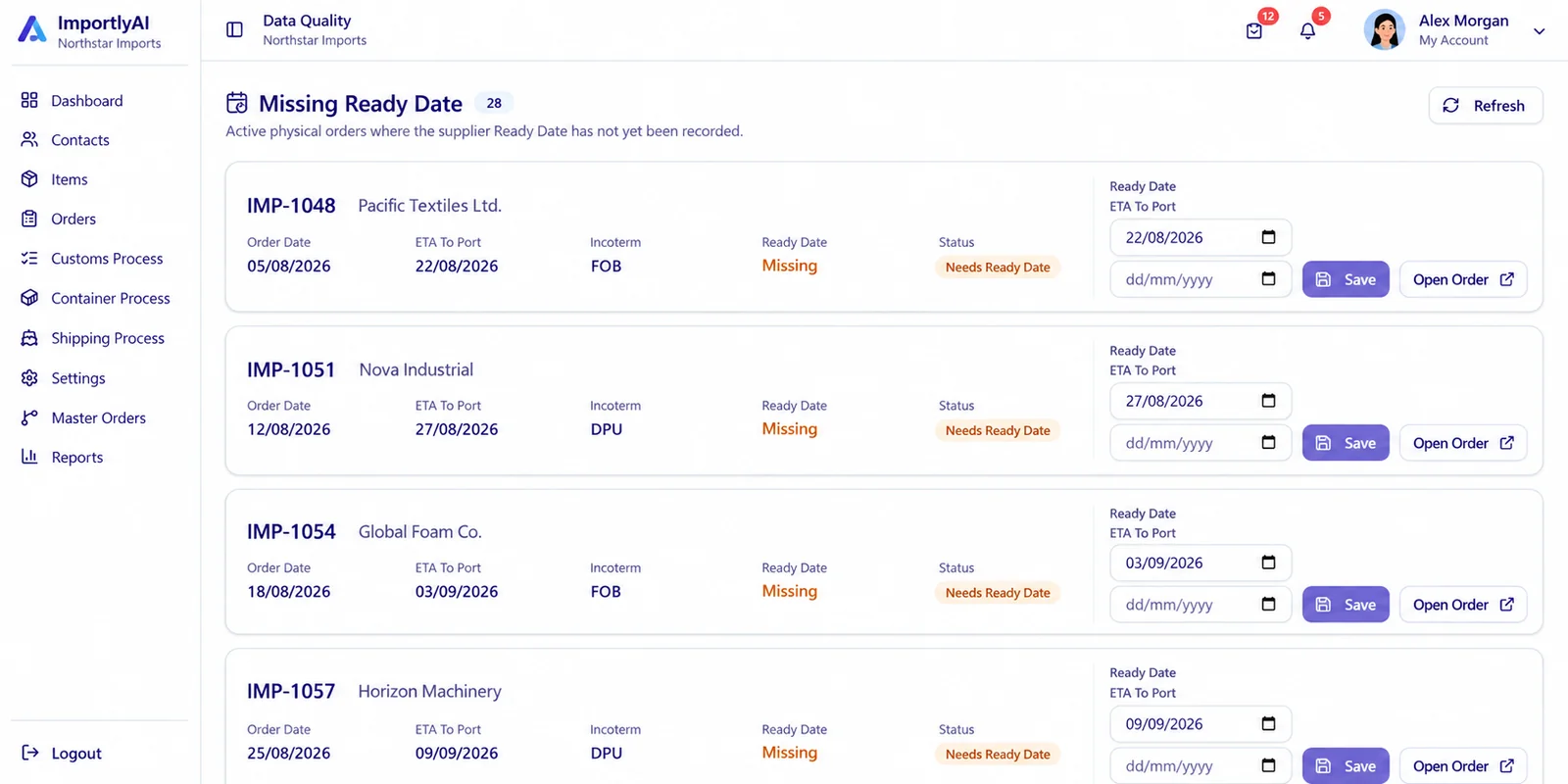
Goods Ready Date missing
IMP-1039
Shipping details required
IMP-1031
Review ETA information
The operational gap
Every shipment generates dates, documents, costs, messages, and decisions. When that information is spread across different tools, small gaps turn into expensive delays.
Order, supplier, shipping, and cost information lives in separate files that quickly become outdated.
Important dates and shipment changes are scattered across emails, calls, and messaging apps.
Incomplete paperwork is often noticed only when the shipment is already approaching the port.
Ready dates, departures, container free days, customs steps, and returns all require constant follow-up.
Without structured assignments and activity history, teams lose track of who owns the next action.
ImportlyAI replaces disconnected follow-ups with one structured operational workflow.
How It Works
Each step stays connected to the order, so authorized team members can see what has happened, what is missing, and what needs attention.
Add suppliers and items, invite users, and set permissions and order visibility for each role. Existing supplier and item lists can be imported from Excel.
Record the approved import order, its items, expected dates, and commercial details. Keep required documents and their review status with the order.
When applicable, record and compare offers received from your own freight providers. Then manage the forwarder, booking, departure, and expected arrival.
Follow document receipt and approval, customs file details, declaration, payment, and clearance with the responsible people.
Follow containers through port arrival, inland transport, warehouse receipt, and return to port. See delays and missing updates.
Use assignments, alerts, discussion, activity history, and reports to coordinate work, manage exceptions, and review performance.
One
connected operational record for each order
Clear
responsibilities and order visibility
Full
follow-through to container return
ImportlyAI records and compares the freight offers your company receives. It does not provide freight quotations, shipping services, or freight prices.
Product
ImportlyAI helps companies manage the operational journey from an approved import order through supplier readiness, items and documents, freight decisions, shipping, customs, inland movement, goods receipt, and container return.
Teams work from the same order record, with assignments, alerts, activity history, and reports to help them follow progress and resolve exceptions. ImportlyAI manages import operations alongside your existing accounting or ERP system; it does not replace it.
Download Product OverviewAvailable today
Orders, shipping, containers, customs, documents, and costs are connected parts of the same process. Company administrators can assign different permissions and order visibility to users according to their responsibilities.
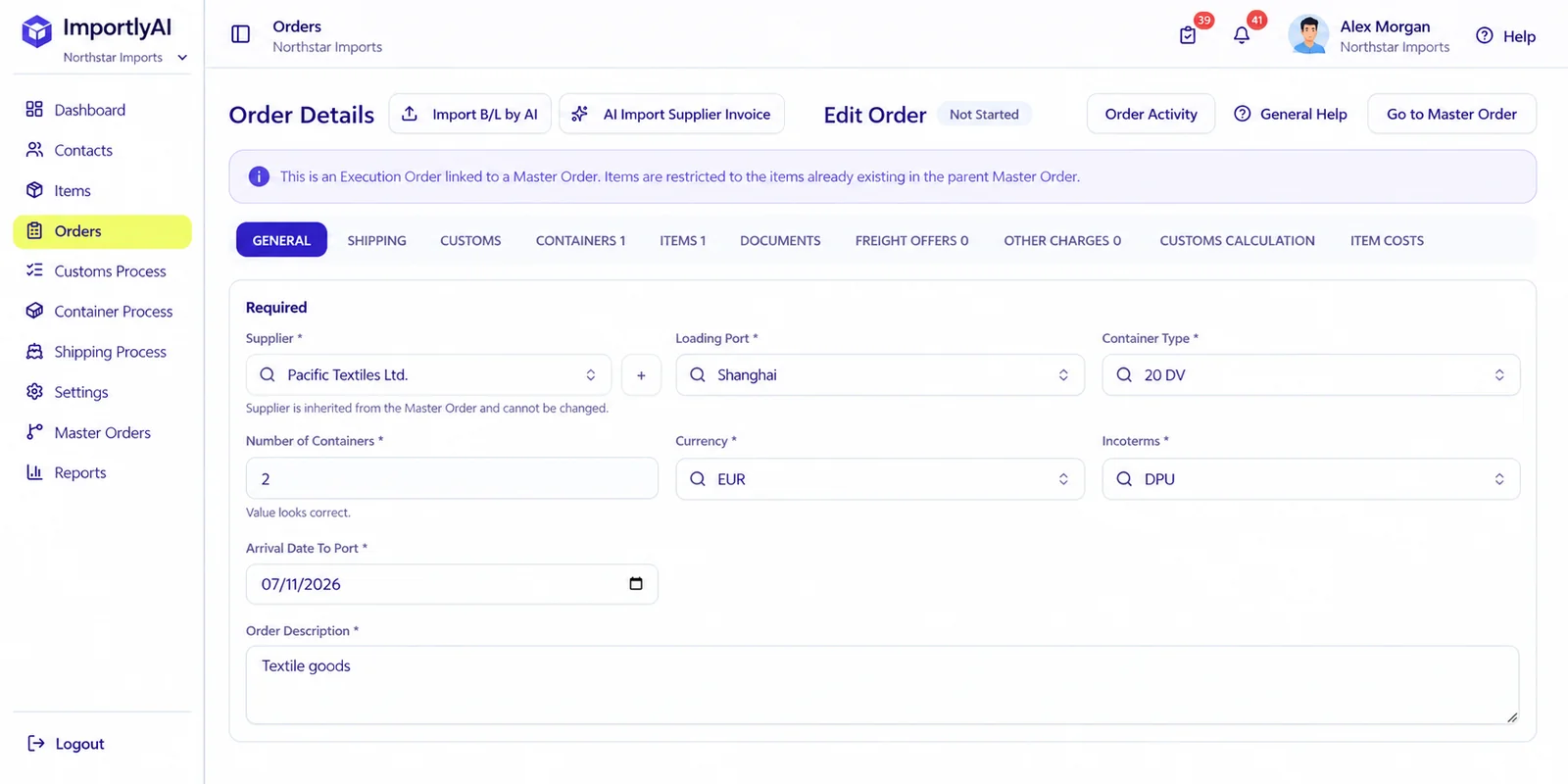
Order Details
Manage supplier information, items, freight offers, shipping, customs, containers, documents and costs from one connected order record.
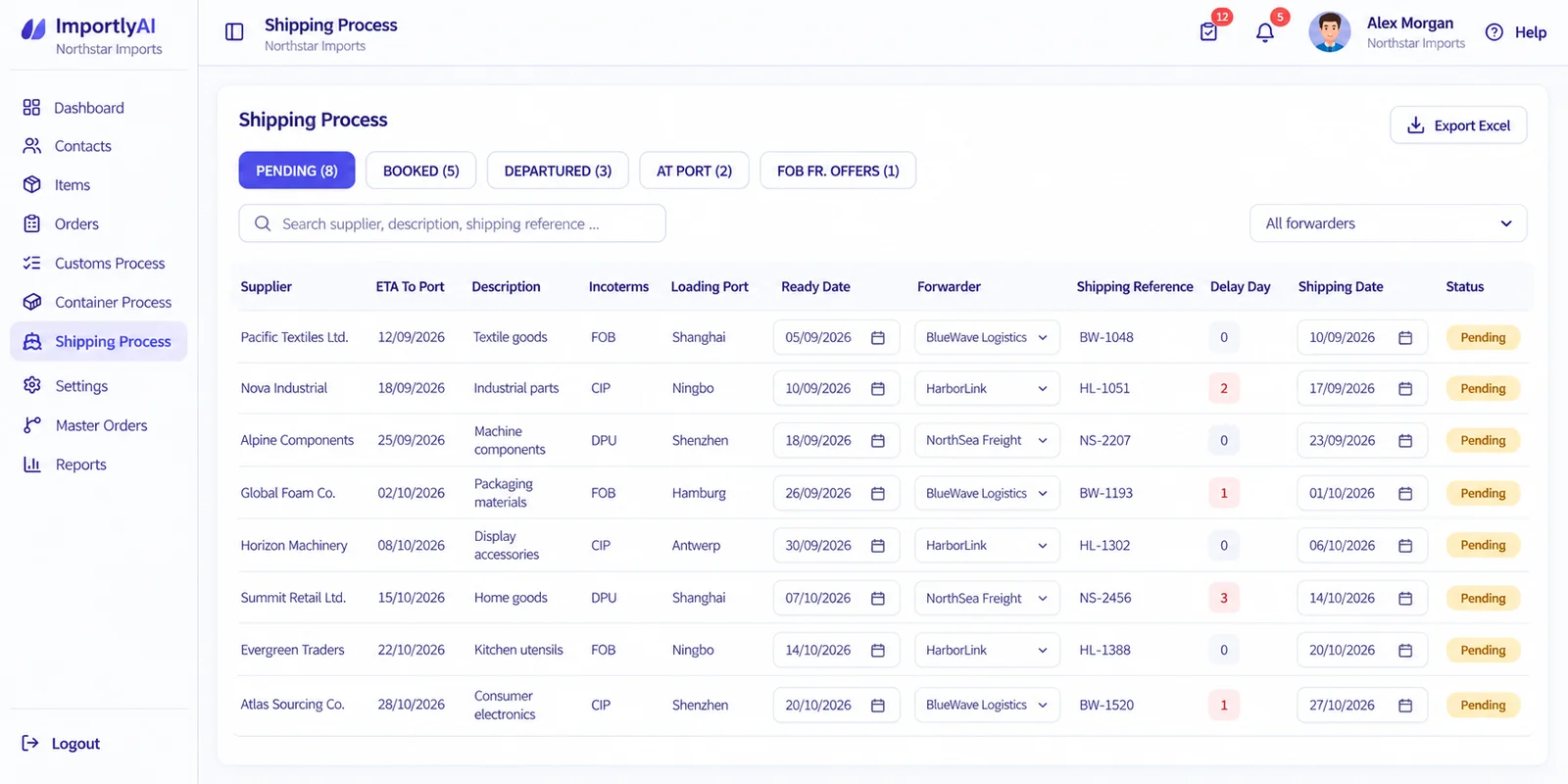
Shipping Process
See what is pending, booked, departed or approaching port while keeping shipping dates, references, forwarders and shipment information organized.
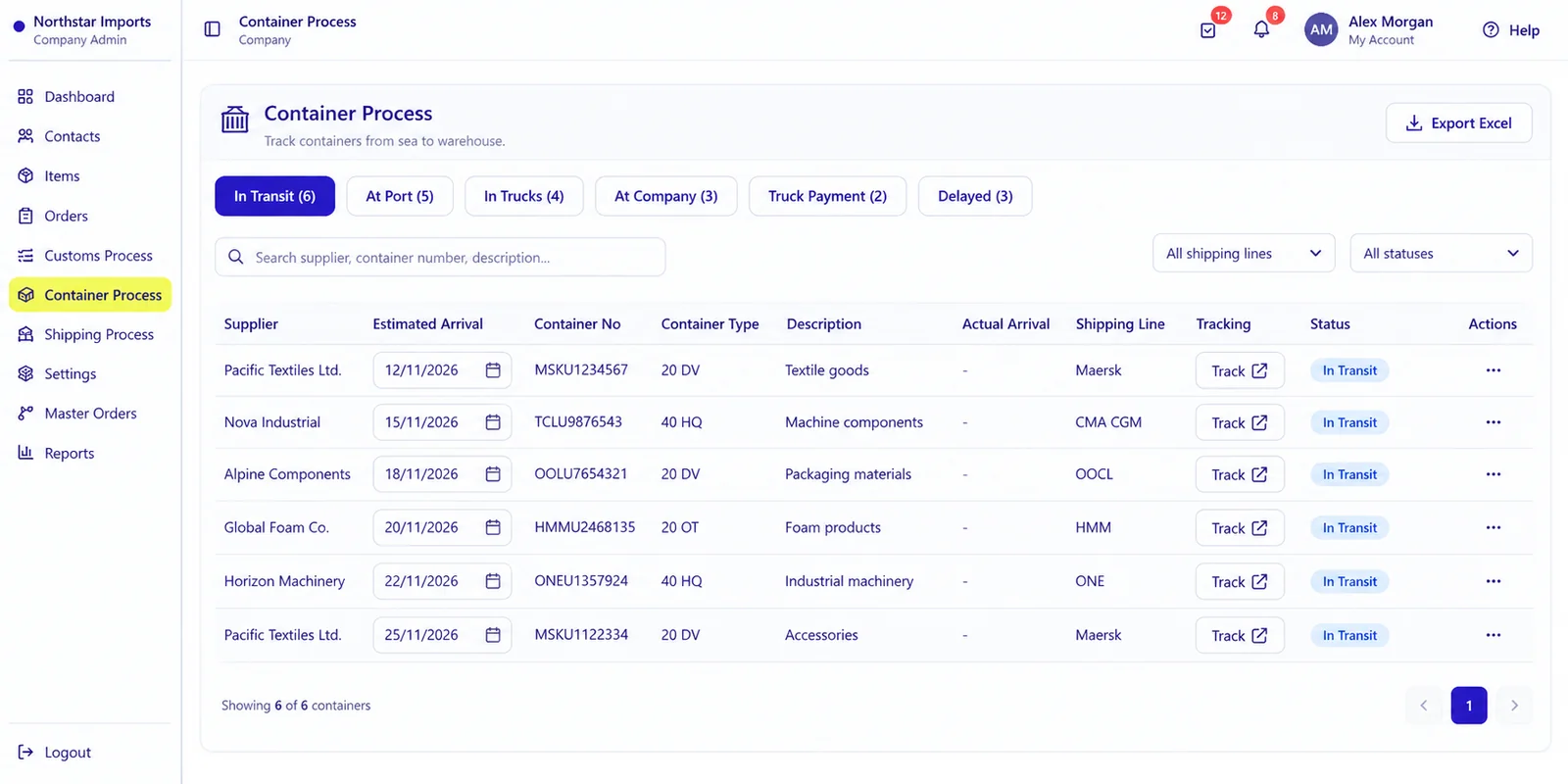
Container Process
Track containers through transit, port arrival, inland transportation, warehouse delivery and return using one operational workflow.
Operational flow
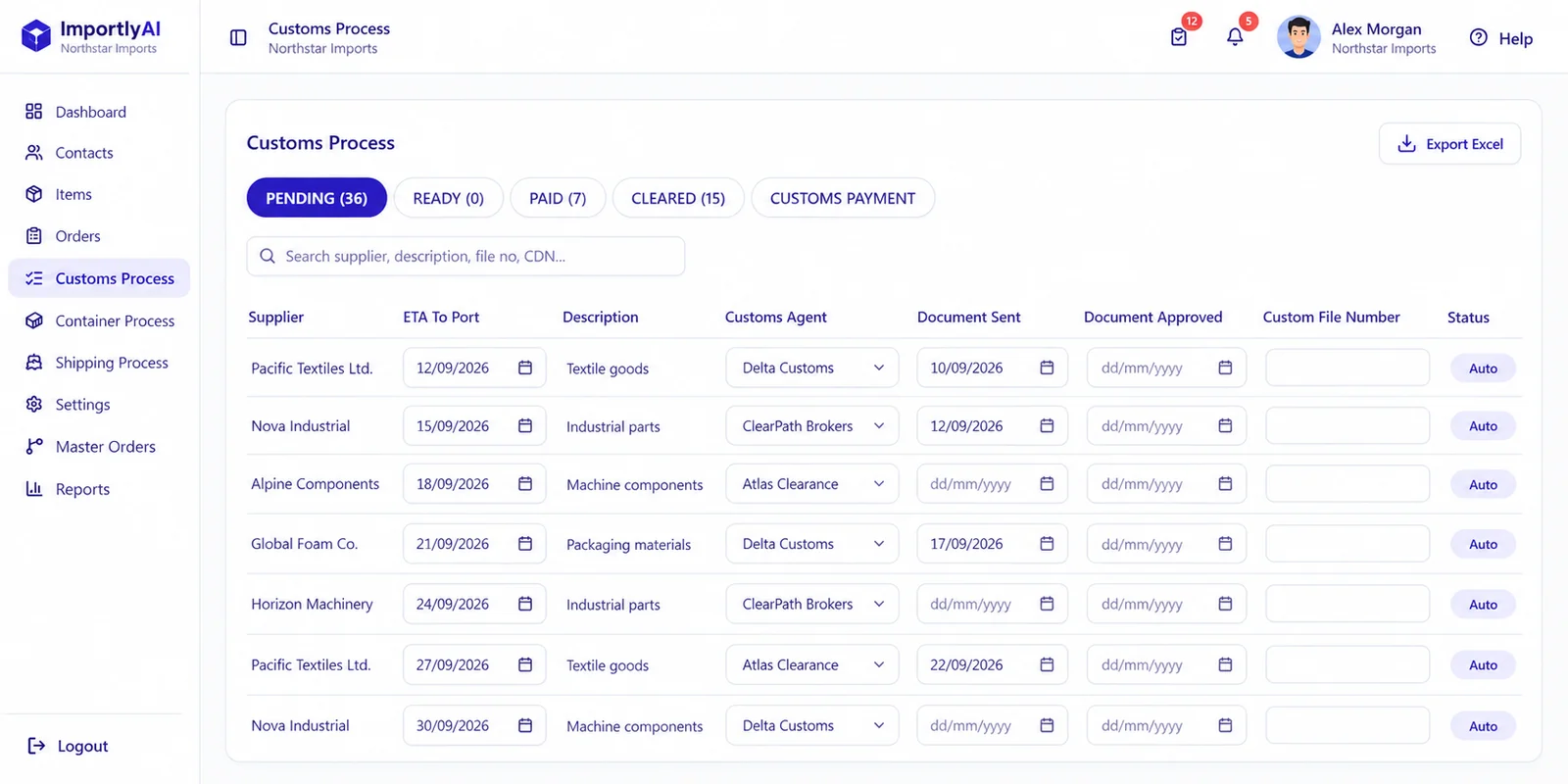
Customs Process
Give the customs team a clear view of what is pending, ready, paid or cleared and which information still requires action.
Data Quality
Identify incomplete documents, missing shipping information, missing warehouse assignments, customs payment requirements and other operational gaps before they become delays.
One import. One connected record.
Every authorized team member works from the information they need.
How It Works · Freight Decisions
Record freight offers received from your own providers and compare dates, transit times, free days, amounts, and currencies within the relevant import order.
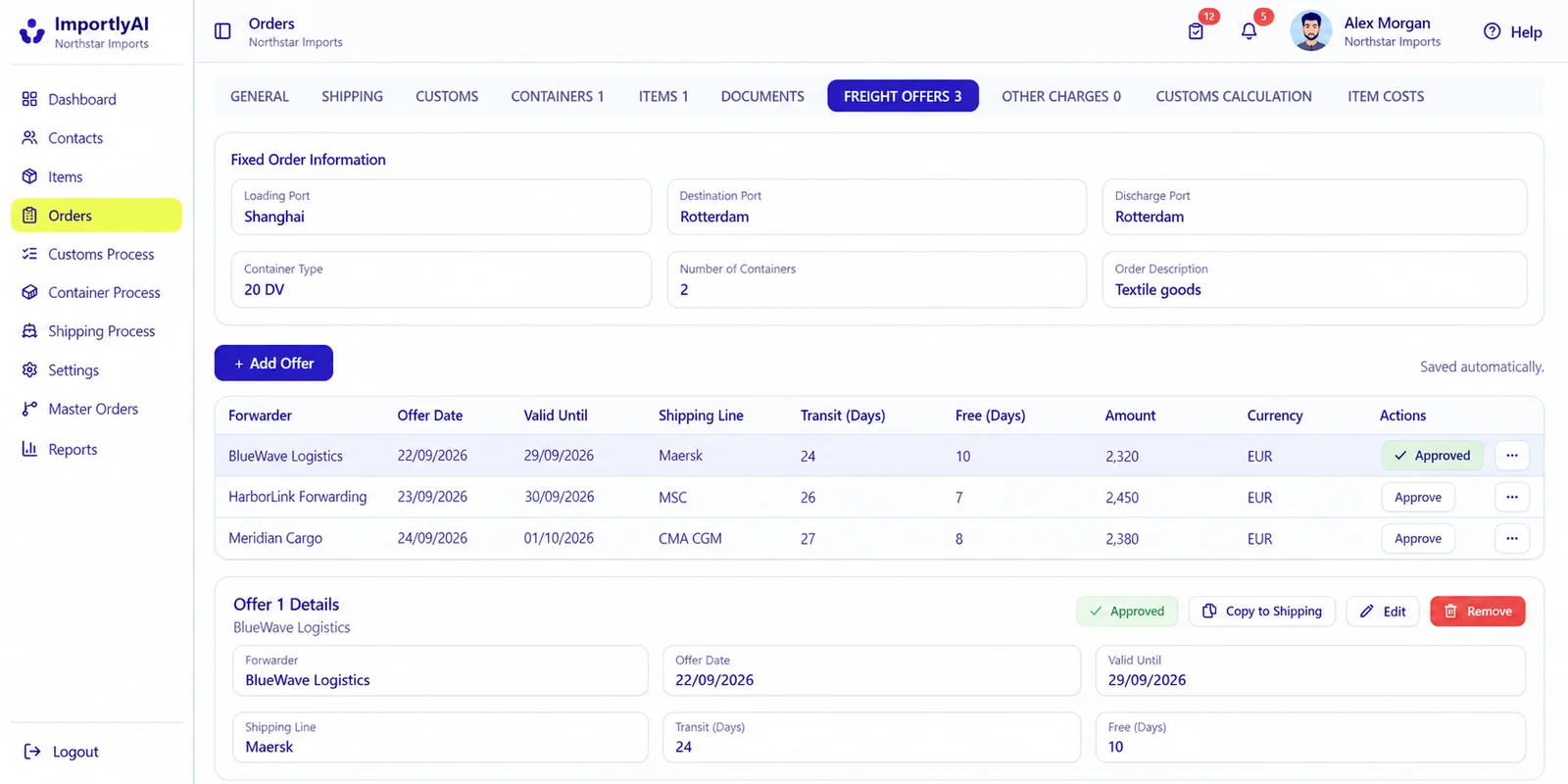
Keep offers received from your freight forwarders connected to the same import order instead of comparing them across emails.
Review ETD, ETA, transit time, and free days together before making a shipping decision.
See offer dates and validity periods so your team knows which quotations are still relevant.
Compare amounts and currencies alongside the operational details of each offer.
ImportlyAI helps your team record and compare offers. It does not issue freight quotations, set freight prices, or provide shipping services.
How It Works · Collaboration
Purchasing, logistics, customs, warehouse, and management can work from the same import record. Company administrators can assign permission groups and limit which orders each user can see.
Manage suppliers, items, commercial details, ready dates, and order information.
Coordinate provider offers, forwarders, shipping dates, containers, and delivery progress.
Work with customs files, documents, approvals, declarations, payments, and clearance status.
Follow inbound containers, warehouse assignments, arrivals, and operational handoffs.
Review progress and exceptions across orders, shipping, customs, and containers.
Example permission group
Logistics Team
Orders
Shipping
Customs
Documents
Company Settings
Access follows each person’s responsibilities
Module permissions control available actions. Order visibility controls which orders a user can access.
ImportlyAI currently brings operational records and workflows together. Teams can use connected information, process views, assignments, and reports to manage their daily work.
AI-assisted document extraction and additional automated checks are future product directions. They should not be treated as available features today.
Orders, suppliers, items, shipping, containers, customs, documents, and costs follow a consistent structure.
Operational details remain linked to the relevant import order instead of being scattered across separate files.
Shipping, customs, and container views help teams follow progress and see what needs attention.
Document statuses and operational views help users identify missing information and incomplete steps.
Available today
Follow orders, documents, shipping, customs, containers, assignments, and reports in the platform.
Future direction
Planned assistance may help prepare information for review. Qualified, authorized people remain responsible for customs classification and compliance decisions.
Today, authorized internal users can collaborate around connected order records. Direct exchange with external partners and synchronization with other software are areas for future development.
Potential future connections
Explore structured exchange of order and commercial information.
Explore connections for documents and clearance information.
Explore connections for shipment and container updates.
Explore connections for delivery, assignment, and receipt information.
Explore ways to exchange relevant order and shipment data.
Explore synchronization with existing enterprise systems where appropriate.
These connections are product directions, not a list of integrations currently available to every workspace. Availability will depend on future development and the systems involved.
ImportlyAI lets different departments work from the same connected import information while permissions and visibility rules control what each user can access and update.
Built for multi-user operations
Purchasing, logistics, customs, warehouse and management teams can collaborate while maintaining clear responsibilities and access boundaries.
Control which modules and actions each permission group can view, create, edit, delete or manage.
Limit which orders individual users can access when they should not have visibility across the entire company workspace.
Keep company data separated by workspace while allowing authorized users to access the companies they work with.
Authentication, workspace codes and user management help control access to operational information.
Our Team
A focused team combining technology, product development and customer experience.

Technical Lead
Computer Engineering
Palestine Polytechnic University
Owns architecture, backend, database, security and infrastructure.

Product Engineer
Computer Science
Palestine Polytechnic University
Builds the product experience, workflows, reports and operational tools.

Customer Success
Software Engineering
Bethlehem University
Works with customers, manages onboarding and brings feedback back to the team.
FAQ
Answers about getting started, daily operations, access, and future product direction.
ImportlyAI manages import operations from an approved order through supplier readiness, documents, shipping, customs, inland delivery, goods receipt, and container return.
Set up the suppliers, items, users, and permissions you need, then begin managing new import orders. You do not need to enter every historical order first.
Yes. Existing supplier and item lists can be imported from Excel. Records can also be added individually as needed.
Yes. Existing supplier and item records reduce repeated entry, and supported information from previous orders can be reused.
Yes. Containers can be recorded individually and followed through port arrival, inland delivery, receipt, and return under the same order.
Process views, document statuses, assignments, notifications, and reports help teams identify missing information, delays, and upcoming actions.
Yes. Required documents and their review status stay with the order. Discussions, assignments, warnings, and activity history also remain linked to it.
Yes. Permission groups control available modules and actions, while order visibility settings determine which orders a user can access.
Yes. Dashboards and reports show operational progress across orders and containers, subject to permissions. Teams can also record supplier evaluations.
No. Your company receives offers from its own freight providers. ImportlyAI lets your team record and compare those offers within the relevant order.
No. ImportlyAI manages the operational import process. Your accounting or ERP system remains responsible for its existing financial and enterprise functions.
ImportlyAI currently organizes import data and operational workflows. AI document extraction, broader external-partner integrations, and ERP synchronization are future product directions, not generally available features today.
No. Any future AI assistance may help prepare or review information, but final customs classification and compliance decisions remain with qualified, authorized people.
Access depends on the accounts, permissions, and order visibility configured for your workspace. Broader direct partner integrations are planned; they should not be assumed to be available today.
Contact Us
Have a question about ImportlyAI or want to discuss how it could fit your company? Send us a message and our team will reply by email.
support@importlyai.comA better foundation for import operations
Bring orders, shipping, customs, containers, documents, costs and team activity into one connected operational platform.
Try ImportlyAI free for 30 days. No payment information is required.
One import. One connected record. Every team working from the same information.